<?xml version="1.0" encoding="utf-8"?>
<feed xmlns="http://www.w3.org/2005/Atom">
  <title>你无法体验苹果本身</title>
  
  <subtitle>人为自然立法</subtitle>
  <link href="https://sakura286.github.io/atom.xml" rel="self"/>
  
  <link href="https://sakura286.github.io/"/>
  <updated>2025-09-18T02:39:42.288Z</updated>
  <id>https://sakura286.github.io/</id>
  
  <author>
    <name>Sakura286</name>
    
  </author>
  
  <generator uri="https://hexo.io/">Hexo</generator>
  
  <entry>
    <title>Debian 打包脚本预处理</title>
    <link href="https://sakura286.github.io/2025-09-17/9f72b4ef6e03/"/>
    <id>https://sakura286.github.io/2025-09-17/9f72b4ef6e03/</id>
    <published>2025-09-17T15:02:35.000Z</published>
    <updated>2025-09-18T02:39:42.288Z</updated>
    
    <content type="html"><![CDATA[<p>有时候我们想要更灵活地处理 Debian 的打包脚本，使得我们可以通过参数来影响 control&#x2F;install 之类的文件，那么应该怎么办呢？</p><h1 id="1-install-的处理"><a href="#1-install-的处理" class="headerlink" title="1. install 的处理"></a>1. install 的处理</h1><p>可以在 install 文件里留一个占位符，然后在 rules 文件里用<code>sed</code>进行替换</p><p>*.install:</p><figure class="highlight makefile"><table><tr><td class="gutter"><pre><span class="line">1</span><br></pre></td><td class="code"><pre><code class="hljs makefile">opt/@FOO_VERSION@/bin<br></code></pre></td></tr></table></figure><p>rules:</p><figure class="highlight makefile"><table><tr><td class="gutter"><pre><span class="line">1</span><br><span class="line">2</span><br><span class="line">3</span><br><span class="line">4</span><br><span class="line">5</span><br><span class="line">6</span><br></pre></td><td class="code"><pre><code class="hljs makefile">foo_version=<span class="hljs-string">&quot;6.4.3&quot;</span><br><br><br><span class="hljs-section">override_dh_install:</span><br>        sed -i <span class="hljs-string">&quot;s,@FOO_VERSION@,$&#123;foo_version&#125;,g&quot;</span> debian/*.install<br>        dh_install<br></code></pre></td></tr></table></figure><p>将文件从 debian&#x2F;tmp 安装到 debian&#x2F;${pkg_name}，是发生在 dh_install 阶段的。所以只要在 dh_install 之前完成替换即可。</p><h1 id="2-control-的处理"><a href="#2-control-的处理" class="headerlink" title="2. control 的处理"></a>2. control 的处理</h1><p><strong>TODO</strong></p>]]></content>


    <summary type="html">&lt;p&gt;有时候我们想要更灵活地处理 Debian 的打包脚本，使得我们可以通过参数来影响 control&amp;#x2F;install 之类的文件，那么应该怎么办呢？&lt;/p&gt;
&lt;h1 id=&quot;1-install-的处理&quot;&gt;&lt;a href=&quot;#1-install-的处理&quot; class=&quot;</summary>


    <category term="repology" scheme="https://sakura286.github.io/tags/repology/"/>
    
    <category term="debian" scheme="https://sakura286.github.io/tags/debian/"/>
    
    <category term="linux" scheme="https://sakura286.github.io/tags/linux/"/>
    
  </entry>
  
  <entry>
    <title>ROCm Debian 支持现状</title>
    <link href="https://sakura286.github.io/2025-07-31/55f7973fbcf3/"/>
    <id>https://sakura286.github.io/2025-07-31/55f7973fbcf3/</id>
    <published>2025-07-31T15:15:50.000Z</published>
    <updated>2025-09-18T02:39:42.288Z</updated>
    
    <content type="html"><![CDATA[<p>本调查于 2025 年 7 月 31 日</p><p>今天在 RISC-V 平台上基于 ROCm 6.4.2 后端，把 Deepseek 70B Q4 跑通了，而且很流畅，有点小高兴。</p><p>可行性验证了，是时候考虑上游化的事情了。</p><p>想从下面几个方面着手调查</p><ol><li>Debian ROCm 的版本</li><li>Debian ROCm 组的活跃情况</li><li>Debian ROCm 对其他架构的支持情况</li></ol><h2 id="基础信息"><a href="#基础信息" class="headerlink" title="基础信息"></a>基础信息</h2><p>ROCm Team 介绍 <a href="https://wiki.debian.org/Teams/ROCm">https://wiki.debian.org/Teams/ROCm</a><br>源码仓库 <a href="https://salsa.debian.org/rocm-team">https://salsa.debian.org/rocm-team</a><br>邮件列表 <a href="https://lists.debian.org/debian-ai/">https://lists.debian.org/debian-ai/</a></p><h2 id="1-版本"><a href="#1-版本" class="headerlink" title="1. 版本"></a>1. 版本</h2><p>以 llama.cpp 所依赖的最高层级的包 hipblas 开始捋，根据<a href="https://qa.debian.org/developer.php?email=debian-ai@lists.debian.org">Packages overview for Debian ROCm Team</a></p><p>hipblas     5.5.1<br>rocsolver   5.5.1<br>rocblas     5.5.1 (experimental: 6.4.1)<br>rocsparse   5.7,1 (experimental: 6.4.1)<br>rocprim     5.7.1 (experimental: 6.4.1)<br>roctracer   5.7.1 (experimental: 6.4.1)</p><p>smi-lib     5.7.1 (experimental: 6.4.1)<br>rocm-hipamd 5.7.1 (experimental: 6.1.5)<br>rocminfo    6.1.2 (experimental: 6.4.1)<br>rocm-llvm   n&#x2F;a   (experimental: 6.1.2)</p><p>附：上游的<br>5.5.1 在 2023.05 发布<br>5.7.1 在 2023.10 发布<br>6.1.2 在 2024.07 发布<br>6.4.1 在 2025.05 发布</p><p>可以看出，除了工具链&#x2F;HIP库略老（6.1.2）之外，重要的数学库已经在 experimental 里更新到了最新的 6.4.1</p><p>或许可以看看 rocm-llvm 与 rocm-hipamd 的更新情况，以及一些不关键的包的升级情况</p><h2 id="2-ROCm-社区活跃情况"><a href="#2-ROCm-社区活跃情况" class="headerlink" title="2. ROCm 社区活跃情况"></a>2. ROCm 社区活跃情况</h2><p>目前有两位活跃的维护者<a href="https://salsa.debian.org/cgmb">Cordell Bloor</a>与<a href="https://salsa.debian.org/ckk">Christian Kastner</a></p><p>最近（三个月内）有其他的代码贡献者，例如<a href="https://salsa.debian.org/kenhys">Kentaro Hayashi</a>，<a href="https://salsa.debian.org/ajqlee">Andrew Lee (李健秋) </a>，<a href="https://salsa.debian.org/bayle">Christian Bayle</a>，<a href="https://salsa.debian.org/kapouer">Jérémy Lal</a>‘。邮件列表里活跃的还有 M. Zhou，</p><p>最近两个月，Cordell Bloor 开始<a href="https://lists.debian.org/debian-ai/2025/05/msg00113.html">搞双周会</a>，但是最近因为他<a href="https://lists.debian.org/debian-ai/2025/07/msg00052.html">休假</a>，所以跳过了一次。目前双周会的链接并未公开，需要给 Bloor 发邮件去要，地址<code>cgmb@slerp.xyz</code></p><h2 id="3-对其他架构的支持"><a href="#3-对其他架构的支持" class="headerlink" title="3. 对其他架构的支持"></a>3. 对其他架构的支持</h2><p>AMD 上游并未提到对特定 CPU 架构的需求，只需该 CPU 支持 PCIe atomic 即可</p><p>Debian 这边支持 amd64 arm64 ppc64el</p><p>2024.12，Cordell Bloor 看到 <a href="https://www.phoronix.com/news/AMDKFD-Compute-POWERPC">POWER 系统支持 ROCm</a>，打算<a href="https://lists.debian.org/debian-ai/2024/12/msg00026.html">搞 arm64 和 ppc64</a></p><p>2025.02，Raptor Computing 给 Debian ROCm 组<a href="(https://lists.debian.org/debian-ai/2025/02/msg00250.html)">提供了一台 ppc64 机器</a>，但是驱动有bug；有人建议<a href="https://lists.debian.org/debian-ai/2025/02/msg00251.html">用树莓派5来做 arm64 的验证</a></p><p>2025.04，</p><p>2025.05</p><p>2025.06</p><p>2025.07</p><h2 id="结论"><a href="#结论" class="headerlink" title="结论"></a>结论</h2>]]></content>


    <summary type="html">&lt;p&gt;本调查于 2025 年 7 月 31 日&lt;/p&gt;
&lt;p&gt;今天在 RISC-V 平台上基于 ROCm 6.4.2 后端，把 Deepseek 70B Q4 跑通了，而且很流畅，有点小高兴。&lt;/p&gt;
&lt;p&gt;可行性验证了，是时候考虑上游化的事情了。&lt;/p&gt;
&lt;p&gt;想从下面几个方面</summary>


  </entry>
  
  <entry>
    <title>十万个为什么</title>
    <link href="https://sakura286.github.io/2025-06-13/a9cedd872168/"/>
    <id>https://sakura286.github.io/2025-06-13/a9cedd872168/</id>
    <published>2025-06-13T09:57:10.000Z</published>
    <updated>2025-09-18T02:39:42.289Z</updated>
    
    <content type="html"><![CDATA[<h2 id="1-ssh-到远程机器上，打开-tmux，如果此时网络断开，为什么终端会把鼠标滚轮解释错误？"><a href="#1-ssh-到远程机器上，打开-tmux，如果此时网络断开，为什么终端会把鼠标滚轮解释错误？" class="headerlink" title="1. ssh 到远程机器上，打开 tmux，如果此时网络断开，为什么终端会把鼠标滚轮解释错误？"></a>1. ssh 到远程机器上，打开 tmux，如果此时网络断开，为什么终端会把鼠标滚轮解释错误？</h2><p>现象1：上滚轮会<code>64;133;44M</code>，下滚轮会输出<code>65;133;44M</code>，进一步观察到，第一个数字只和鼠标滚轮方向有关，向上是<code>64</code>，向下是<code>65</code>，而后面两个数字，则和鼠标所在位置有一定的关系，第2个数字，是光标在 x 轴上的位置，第3个数字，是光标在y轴上的位置。再进一步观察，第一个数字和鼠标操作有关，鼠标左键是<code>0</code>，鼠标右键是<code>2</code>，鼠标中键是<code>1</code>，鼠标拖动是<code>32</code>，前进后退键无反应。</p><p>现象2：使用 reset 命令后不再解释错误</p><p>回答：结合最后的<code>M</code>，可以判断，这应该是终端所捕获的鼠标命令，第一个数字代表鼠标操作类型，第二个数字是鼠标横轴位置，第二个数字是鼠标纵轴位置，可是这</p><p>现象2：使用 reset 命令后不再解释错误。</p><p>回答：reset 重置了虚拟终端的状态，使其不再相应鼠标事件。可以通过这样一个简单的操作[^1][^2]来启用鼠标追踪，复现上面的问题：</p><figure class="highlight bash"><table><tr><td class="gutter"><pre><span class="line">1</span><br></pre></td><td class="code"><pre><code class="hljs bash"><span class="hljs-built_in">echo</span> -e <span class="hljs-string">&quot;\e[?1000;1006;1015h&quot;</span><br></code></pre></td></tr></table></figure><h2 id="2-复制-tmux-的内容时，有时会产生"><a href="#2-复制-tmux-的内容时，有时会产生" class="headerlink" title="2. 复制 tmux 的内容时，有时会产生"></a>2. 复制 tmux 的内容时，有时会产生</h2><p>[^1] <a href="https://unix.stackexchange.com/questions/35021#509695">How to configure the terminal so that a mouse click will move the cursor to the current mouse position - StackExchange</a><br>[^2] <a href="https://stackoverflow.com/questions/5966903">how to get MouseMove and MouseClick in bash?</a></p><p>参考资料</p><ul><li>man read(1) <a href="https://man7.org/linux/man-pages/man1/read.1p.html">https://man7.org/linux/man-pages/man1/read.1p.html</a></li><li>man reset(1) <a href="https://linux.die.net/man/1/reset">https://linux.die.net/man/1/reset</a></li><li>XTERM Console Codes <a href="https://tintin.mudhalla.net/info/xterm/">https://tintin.mudhalla.net/info/xterm/</a></li><li>how to get MouseMove and MouseClick in bash? <a href="https://stackoverflow.com/questions/5966903">https://stackoverflow.com/questions/5966903</a></li><li>What are the button codes for mouse scroll wheel left&#x2F;right, in DECSET SGR 1006? <a href="https://stackoverflow.com/questions/51578176">https://stackoverflow.com/questions/51578176</a></li><li>How to configure the terminal so that a mouse click will move the cursor to the current mouse position <a href="https://unix.stackexchange.com/questions/35021">https://unix.stackexchange.com/questions/35021</a></li><li>Complex mouse inputs in XTerm <a href="https://unix.stackexchange.com/questions/518479">https://unix.stackexchange.com/questions/518479</a></li><li>VT220 <a href="https://en.wikipedia.org/wiki/VT220">https://en.wikipedia.org/wiki/VT220</a></li><li>XTerm Control Sequences <a href="https://invisible-island.net/xterm/ctlseqs/ctlseqs.html#h2-Mouse-Tracking">https://invisible-island.net/xterm/ctlseqs/ctlseqs.html#h2-Mouse-Tracking</a></li><li>XTerm Control Sequences <a href="https://invisible-island.net/xterm/ctlseqs/ctlseqs.pdf">https://invisible-island.net/xterm/ctlseqs/ctlseqs.pdf</a></li><li></li><li></li></ul>]]></content>


    <summary type="html">&lt;h2 id=&quot;1-ssh-到远程机器上，打开-tmux，如果此时网络断开，为什么终端会把鼠标滚轮解释错误？&quot;&gt;&lt;a href=&quot;#1-ssh-到远程机器上，打开-tmux，如果此时网络断开，为什么终端会把鼠标滚轮解释错误？&quot; class=&quot;headerlink&quot; title=&quot;</summary>


  </entry>
  
  <entry>
    <title>\[译\] 在日本，有关摩托车的基础知识</title>
    <link href="https://sakura286.github.io/2025-01-19/5b7fdd641b26/"/>
    <id>https://sakura286.github.io/2025-01-19/5b7fdd641b26/</id>
    <published>2025-01-19T21:40:26.000Z</published>
    <updated>2025-09-18T02:39:42.288Z</updated>
    
    <content type="html"><![CDATA[<blockquote><p>本文译自<a href="https://www.tossnet.or.jp/portals/0/resouce/staticContents/public_html/u_qanda/bike01.html">バイクについての基礎知識 - Tossnet</a> ，<a href="https://archive.ph/wip/KEOjR">已归档</a></p></blockquote><h2 id="（一）分类"><a href="#（一）分类" class="headerlink" title="（一）分类"></a>（一）分类</h2><p>摩托车作为车辆而言，在《道路交通法》根据道路交通的情况进行了分类，在《道路运送车辆法》中根据车辆技术标准进行了定义。此外，《道路交通法》对摩托车的驾照也进行了区分。</p><h3 id="在《道路交通法》中的分类"><a href="#在《道路交通法》中的分类" class="headerlink" title="在《道路交通法》中的分类"></a>在《道路交通法》中的分类</h3><p>根据《道路交通法》，摩托车的分类如下：50cc以下为“原动机付自行车”（原付），50cc以上至400cc为“普通自动二轮车”（普通二轮），400cc以上为“大型自动二轮车”（大型二轮）。因此，根据该法，50cc以上的摩托车属于“自动车”。此外，驾照种类也是依此来划分的。[^1]</p><h3 id="在《道路运送车辆法》中的分类"><a href="#在《道路运送车辆法》中的分类" class="headerlink" title="在《道路运送车辆法》中的分类"></a>在《道路运送车辆法》中的分类</h3><p>根据《道路运送车辆法》，排量在125cc以下的摩托车方为“自动车”。其中，排量在50cc以下的称为“第一类原动机付自行车”，排量超过50cc但不超过125cc的摩托车称为“第二类原动机付自行车”。<br>此外，排量超过125cc但不超过250cc的摩托车被归类为“轻型二轮自动车”（轻二轮），排量超过250cc的则被归类为“小型二轮自动车”（小型二轮），两者都属于自动车。[^2]</p><p class='item-img' data-src='/source/images/f14fde37-db57-4aac-95aa-bd7d9805dc3b.gif'><img src="/source/images/f14fde37-db57-4aac-95aa-bd7d9805dc3b.gif" alt="图示"></p><h2 id="（二）注册登记"><a href="#（二）注册登记" class="headerlink" title="（二）注册登记"></a>（二）注册登记</h2><p>根据《道路运送车辆法》，自动车必须通过“注册”（原文：登録）手续后才能使用，然而摩托车不在“注册”之列，其手续如下：</p><ul><li><p><strong>小型二轮车</strong>（250cc以上排量）<br>需要在运输局进行新车检查后，方能获得指定的车辆编号。虽然这一手续与汽车的“注册”不同，但在实际操作中通常被视为“登录”。</p></li><li><p><strong>轻型二轮车</strong>（125cc至250cc排量）<br>需要向运输局“申报”，并获得车辆编号的指定。</p></li><li><p><strong>原付</strong>（125cc以下排量）<br>对于一二类原付，无需向运输局申报，只需根据地方税法，向市、区、町、村提交地方税纳税申告书，并领取车牌。</p></li></ul><h2 id="（三）车检"><a href="#（三）车检" class="headerlink" title="（三）车检"></a>（三）车检</h2><p>摩托车和四轮车一样，也有“车检”，但需要注意的是，根据排量的不同，有些车辆（如原付等）是不需要车检的。不过，即使无需车检，也并不意味着完全不需要检查和维护，因此日常的保养工作不可忽视。</p><ul><li><p><strong>小型二轮车</strong>（250cc以上排量）<br>运输局的检查有效期为2年，如果期满后继续使用，则需要每2年进行一次续检。</p></li><li><p><strong>轻型二轮车</strong>（125cc至250cc排量）<br>根据《道路运送车辆法》的规定，属于“免检轻型自动车”，因此无需接受检查。</p></li><li><p><strong>原付</strong>（125cc以下排量）<br>原付（125cc以下）在《道路运送车辆法》中不属于自动车，因此无需接受检查。</p></li></ul><blockquote><p>根据《道路运送车辆法》的安全标准，摩托车的前照灯在发动机工作时必须保持常。此规定于1996年指定，并从1998年4月1日起对国内所有量产车（包括进口车）强制执行。</p></blockquote><h2 id="（四）驾照"><a href="#（四）驾照" class="headerlink" title="（四）驾照"></a>（四）驾照</h2><p>必须持有驾照（免许），才能在公路上驾驶摩托车。</p><p>摩托车驾照分为“大型二轮”、“普通二轮”和“原付”三种，此外在取得“四轮自动车”驾照时，也可以同时获取某些摩托车驾照。详情见下表。</p><p class='item-img' data-src='/source/images/1e8837af-797a-492f-ae18-bda2d0454325.gif'><img src="/source/images/1e8837af-797a-492f-ae18-bda2d0454325.gif" alt="日本摩托驾照分类"><br>※“大型驾照”需要在取得普通驾照或大型特殊驾照后，累计满2年才能申请。</p><h3 id="驾照的考取"><a href="#驾照的考取" class="headerlink" title="驾照的考取"></a>驾照的考取</h3><p>参加笔试和实操考试并合格后，即可取得驾照。</p><h3 id="取得驾照的年龄"><a href="#取得驾照的年龄" class="headerlink" title="取得驾照的年龄"></a>取得驾照的年龄</h3><p>16岁后可以考取原付和普通二轮驾照，18岁后可以考取大型二轮驾照。</p><h3 id="大型二轮驾照和普通二轮驾照的取得与培训"><a href="#大型二轮驾照和普通二轮驾照的取得与培训" class="headerlink" title="大型二轮驾照和普通二轮驾照的取得与培训"></a>大型二轮驾照和普通二轮驾照的取得与培训</h3><p>大型二轮驾照和普通二轮驾照均可通过在指定的驾校培训取得。培训主要分为限定普通二轮小型（可驾驶125cc以下）、无限定普通二轮（可驾驶400cc以下）和大型二轮（无排量限制）三种类型。从较小排量的驾照开始考，培训的总时间较少，更容易获得驾照。</p><h3 id="持有普通驾照的人也可以驾驶原付"><a href="#持有普通驾照的人也可以驾驶原付" class="headerlink" title="持有普通驾照的人也可以驾驶原付"></a>持有普通驾照的人也可以驾驶原付</h3><p>持有普通驾照或大型驾照的人可以驾驶50cc以下的原付。实际上，日常使用原付的人中，约有30%是通过考取普通驾照来驾驶的。</p><h3 id="二轮驾照与普通自动车驾照的笔试结果互认"><a href="#二轮驾照与普通自动车驾照的笔试结果互认" class="headerlink" title="二轮驾照与普通自动车驾照的笔试结果互认"></a>二轮驾照与普通自动车驾照的笔试结果互认</h3><p>根据《道路交通法》修订案，普通二轮、大型二轮与普通自动车的笔试结果互认。因此，持有普通二轮或大型二轮驾照的人在考取普通汽车驾照时无需参加笔试，反之亦然。这使得驾照的获取变得更为便捷。</p><h3 id="二轮驾照的取得方法"><a href="#二轮驾照的取得方法" class="headerlink" title="二轮驾照的取得方法"></a>二轮驾照的取得方法</h3><p><a href="http://www.keishicho.metro.tokyo.jp/menkyo/submenu.htm">驾照考取相关信息主页（链接源自警视厅）</a></p><h2 id="（五）有关税种"><a href="#（五）有关税种" class="headerlink" title="（五）有关税种"></a>（五）有关税种</h2><p>持有摩托车，需要根据车辆分类缴纳以下税款：</p><h3 id="自动车车重税"><a href="#自动车车重税" class="headerlink" title="自动车车重税"></a>自动车车重税</h3><p>该税仅针对两种摩托车征收：已取得机动车检验证书的受检车辆（即小型二轮车），以及已申报并分配车辆编号的免检车辆（即轻型二轮车）。小型二轮车在每次检查时缴纳，轻型二轮仅在申报时缴纳。大部分收入将拨给国家和地方政府道路基金。</p><h3 id="轻自动车税"><a href="#轻自动车税" class="headerlink" title="轻自动车税"></a>轻自动车税</h3><p>就摩托车而言，从原付到小型二轮车的所有车型均需缴纳。缴纳时间为每年4月1日，纳税义务人为车辆所有者，税收收入作为地方政府的一般财政收入。</p><p class='item-img' data-src='/source/images/665744ef-90e9-4bfc-90e3-a0d8e0d59b7e.gif'><img src="/source/images/665744ef-90e9-4bfc-90e3-a0d8e0d59b7e.gif" alt="摩托车相关税款"></p><h2 id="（六）保险"><a href="#（六）保险" class="headerlink" title="（六）保险"></a>（六）保险</h2><p>在日本，根据《自动车损害赔偿补偿法》[^8]，包括摩托车在内的所有自动车与原付都必须加入“自动车损害赔偿责任保险”（自赔责保险）。对于没有自赔责的情况下驾驶自动车的行为，将处以最高六个月的有期徒刑或最高 50,000 日元的罚款，驾照扣扣 6 分并吊销 30 天。调查显示，约有5%的原付车主没有购买自赔责，已经成为了非常严重的问题。</p><p><strong>自赔责保险费用表</strong></p><p>(本表修订时间：2006年4月1日)</p><table><thead><tr><th>分类</th><th>排量</th><th>12个月</th><th>24个月</th><th>25个月</th><th>36个月</th></tr></thead><tbody><tr><td>小型二轮车</td><td>250cc以上</td><td>1,2630</td><td>2,0150</td><td>2,0770</td><td>-</td></tr><tr><td>轻二轮车</td><td>125cc~250cc</td><td>9740</td><td>1,4410</td><td>-</td><td>1,8990</td></tr><tr><td>原付</td><td>125cc以下</td><td>7580</td><td>1,0140</td><td>-</td><td>1,2650</td></tr></tbody></table><p>对于自赔责保险无法承保的部分，可以由其他保险来承担。可选保险种类繁多，例如人身伤害责任险和财产损失责任险，但保险公司也将几种类型的保险打包出售，称为“自动车综合保险”（PAP，Package Automobile Policy）。PAP 包括如下险种：</p><h3 id="（1）人身伤害责任险"><a href="#（1）人身伤害责任险" class="headerlink" title="（1）人身伤害责任险"></a>（1）人身伤害责任险</h3><p>当您在人身伤害事故中被追究赔偿责任时，此保险将承担自赔责保险无法承保的金额。</p><h3 id="（2）个人意外伤害险"><a href="#（2）个人意外伤害险" class="headerlink" title="（2）个人意外伤害险"></a>（2）个人意外伤害险</h3><p>如果驾驶员在个人意外事故[^9]中死亡或受伤，由此类保险赔付。</p><h3 id="（3）未投保机动车意外伤害保险"><a href="#（3）未投保机动车意外伤害保险" class="headerlink" title="（3）未投保机动车意外伤害保险"></a>（3）未投保机动车意外伤害保险</h3><p>这是当事故发生时，另一方没有保险时，向被保险一方的驾驶员和乘客的死亡、受伤和永久残疾进行赔偿的保险。</p><h3 id="（4）财产损失保险"><a href="#（4）财产损失保险" class="headerlink" title="（4）财产损失保险"></a>（4）财产损失保险</h3><p>当您在财产损失事故中被要求赔偿时，由此类保险赔付。</p><h3 id="（5）旅客意外伤害保险"><a href="#（5）旅客意外伤害保险" class="headerlink" title="（5）旅客意外伤害保险"></a>（5）旅客意外伤害保险</h3><p>被保人车辆中的乘客死亡、受伤或永久残疾，由此类保险赔付。</p><p>[^1] 专业术语我尽量只把日文汉字简化。其实把“原付”翻译成“助动车”，“自动车”翻译成“机动车”更容易让人理解。</p><p>[^2] 这里有点绕，在《道路交通法》里，400 以上是大型二轮；但《道路运送车辆法》里，400 以上却成了小型二轮。究其原因是限定词不同，前者的“大型自动二轮车”里的“大型”修饰的是“自动二轮车”，后者的“二轮小型自动车”里的“小型”修饰的是“自动车”，而“自动车”类似于国内的“机动车”，包括了二轮摩托与四轮汽车，再大排量的摩托，比起汽车来也算“小型”的。</p><p>[^8] 类似于中国的“机动车交通事故责任强制保险”（交强险）</p><p>[^9] TODO：这种事故中文中应该有对应的词语，待查</p>]]></content>


    <summary type="html">&lt;blockquote&gt;
&lt;p&gt;本文译自&lt;a href=&quot;https://www.tossnet.or.jp/portals/0/resouce/staticContents/public_html/u_qanda/bike01.html&quot;&gt;バイクについての基礎知識 - Toss</summary>


    <category term="translate" scheme="https://sakura286.github.io/tags/translate/"/>
    
    <category term="japan" scheme="https://sakura286.github.io/tags/japan/"/>
    
    <category term="motor" scheme="https://sakura286.github.io/tags/motor/"/>
    
  </entry>
  
  <entry>
    <title>专业术语对比</title>
    <link href="https://sakura286.github.io/2025-01-19/6671aefae131/"/>
    <id>https://sakura286.github.io/2025-01-19/6671aefae131/</id>
    <published>2025-01-19T21:26:17.000Z</published>
    <updated>2025-09-18T02:39:42.289Z</updated>
    
    <content type="html"><![CDATA[<table><thead><tr><th>日文</th><th>假名&#x2F;外文</th><th>中文</th><th>备注</th></tr></thead><tbody><tr><td>教習所</td><td>きょうしゅうじょ</td><td>学习……的地方；驾校</td><td></td></tr><tr><td>原付</td><td>げんつき</td><td>助动车</td><td></td></tr><tr><td>デュアルパーパス</td><td>Dual Purpose</td><td>多功能摩托车（轻型ADV）</td><td></td></tr></tbody></table>]]></content>


    <summary type="html">&lt;table&gt;
&lt;thead&gt;
&lt;tr&gt;
&lt;th&gt;日文&lt;/th&gt;
&lt;th&gt;假名&amp;#x2F;外文&lt;/th&gt;
&lt;th&gt;中文&lt;/th&gt;
&lt;th&gt;备注&lt;/th&gt;
&lt;/tr&gt;
&lt;/thead&gt;
&lt;tbody&gt;&lt;tr&gt;
&lt;td&gt;教習所&lt;/td&gt;
&lt;td&gt;きょうしゅうじょ&lt;/td&gt;
&lt;td&gt;学</summary>


    <category term="motor" scheme="https://sakura286.github.io/tags/motor/"/>
    
    <category term="key-polity" scheme="https://sakura286.github.io/tags/key-polity/"/>
    
    <category term="Japan" scheme="https://sakura286.github.io/tags/Japan/"/>
    
  </entry>
  
  <entry>
    <title>中日摩托车类型与市场的区别</title>
    <link href="https://sakura286.github.io/2025-01-17/30defce748dc/"/>
    <id>https://sakura286.github.io/2025-01-17/30defce748dc/</id>
    <published>2025-01-17T18:33:17.000Z</published>
    <updated>2025-09-18T02:39:42.288Z</updated>
    
    <content type="html"><![CDATA[<p>此文尚未完成，如果想看此内容麻烦到<a href="https://github.com/Sakura286/MyBlog">我的仓库</a>催我更新。</p>]]></content>


    <summary type="html">&lt;p&gt;此文尚未完成，如果想看此内容麻烦到&lt;a href=&quot;https://github.com/Sakura286/MyBlog&quot;&gt;我的仓库&lt;/a&gt;催我更新。&lt;/p&gt;
</summary>


    <category term="motor" scheme="https://sakura286.github.io/tags/motor/"/>
    
    <category term="key-polity" scheme="https://sakura286.github.io/tags/key-polity/"/>
    
  </entry>
  
  <entry>
    <title>dpkg-source 到底做了什么？</title>
    <link href="https://sakura286.github.io/2025-01-17/5c4d034fb128/"/>
    <id>https://sakura286.github.io/2025-01-17/5c4d034fb128/</id>
    <published>2025-01-17T18:18:22.000Z</published>
    <updated>2025-09-18T02:39:42.288Z</updated>
    
    <content type="html"><![CDATA[<p>此文尚未完成，如果想看此内容麻烦到<a href="https://github.com/Sakura286/MyBlog">我的仓库</a>催我更新。</p>]]></content>


    <summary type="html">&lt;p&gt;此文尚未完成，如果想看此内容麻烦到&lt;a href=&quot;https://github.com/Sakura286/MyBlog&quot;&gt;我的仓库&lt;/a&gt;催我更新。&lt;/p&gt;
</summary>


    <category term="repology" scheme="https://sakura286.github.io/tags/repology/"/>
    
    <category term="debian" scheme="https://sakura286.github.io/tags/debian/"/>
    
    <category term="linux" scheme="https://sakura286.github.io/tags/linux/"/>
    
  </entry>
  
  <entry>
    <title>日本禁摩考</title>
    <link href="https://sakura286.github.io/2025-01-17/5450c092b915/"/>
    <id>https://sakura286.github.io/2025-01-17/5450c092b915/</id>
    <published>2025-01-17T17:08:17.000Z</published>
    <updated>2025-09-18T02:39:42.289Z</updated>
    
    <content type="html"><![CDATA[<p>此文尚未完成，如果想看此内容麻烦到<a href="https://github.com/Sakura286/MyBlog">我的仓库</a>催我更新。</p>]]></content>


    <summary type="html">&lt;p&gt;此文尚未完成，如果想看此内容麻烦到&lt;a href=&quot;https://github.com/Sakura286/MyBlog&quot;&gt;我的仓库&lt;/a&gt;催我更新。&lt;/p&gt;
</summary>


    <category term="motor" scheme="https://sakura286.github.io/tags/motor/"/>
    
    <category term="key-polity" scheme="https://sakura286.github.io/tags/key-polity/"/>
    
  </entry>
  
  <entry>
    <title>日本二轮车式微史考</title>
    <link href="https://sakura286.github.io/2025-01-17/5a3da242fcb7/"/>
    <id>https://sakura286.github.io/2025-01-17/5a3da242fcb7/</id>
    <published>2025-01-17T16:53:34.000Z</published>
    <updated>2025-09-18T02:39:42.289Z</updated>
    
    <content type="html"><![CDATA[<p>此文尚未完成，如果想看此内容麻烦到<a href="https://github.com/Sakura286/MyBlog">我的仓库</a>催我更新。</p>]]></content>


    <summary type="html">&lt;p&gt;此文尚未完成，如果想看此内容麻烦到&lt;a href=&quot;https://github.com/Sakura286/MyBlog&quot;&gt;我的仓库&lt;/a&gt;催我更新。&lt;/p&gt;
</summary>


    <category term="motor" scheme="https://sakura286.github.io/tags/motor/"/>
    
    <category term="key-polity" scheme="https://sakura286.github.io/tags/key-polity/"/>
    
  </entry>
  
  <entry>
    <title>关于“禁摩”一词内涵的思考</title>
    <link href="https://sakura286.github.io/2025-01-05/630d5614cfa7/"/>
    <id>https://sakura286.github.io/2025-01-05/630d5614cfa7/</id>
    <published>2025-01-05T11:12:07.000Z</published>
    <updated>2025-09-18T02:39:42.289Z</updated>
    
    <content type="html"><![CDATA[<p>无论是不是摩托车骑手，但凡经历过城市生活的人，应该都对“禁摩”的概念有着或多或少的认识。但是“禁摩”的含义到底是什么，在讨论中很容易变成“（地方）政府对摩托车的各种限制性行为”，可是这些“限制性行为”到底指什么？如果我们不下更清晰的定义，那么相关的各种讨论都将是空中楼阁。</p><p>目前国内不同地区对摩托车的限制性行为大致有以下几种：</p><ol><li>指定区域&#x2F;时间禁止摩托车通行[^1]</li><li>不允许摩托车上高速[^2]</li><li>禁止摩托车注册、登记、上牌</li><li>摩托车 13 年强制报废</li><li>不允许摩托车加油，或对摩托车加油有歧视性政策</li></ol><p>其中，“指定区域&#x2F;时间”禁止摩托车通行是最狭义上的“禁摩”，也是最具争议的一项。后面我会通过一系列的文章，对上述中的每一条内容做一些简单的陈述与剖析。</p><p>[^1]: <a href="https://zh.wikipedia.org/wiki/%E4%B8%AD%E5%9B%BD%E5%A4%A7%E9%99%86%E7%A6%81%E6%91%A9">中国大陆禁摩 - 维基百科</a><br>[^2]: <a href="https://www.bilibili.com/opus/943286912559349762">全国摩托车上高速省份情况科普（仅供参考）山西省根据后续情况更新 - 爱国的海豹黄师傅 - bilibili</a></p>]]></content>


    <summary type="html">&lt;p&gt;无论是不是摩托车骑手，但凡经历过城市生活的人，应该都对“禁摩”的概念有着或多或少的认识。但是“禁摩”的含义到底是什么，在讨论中很容易变成“（地方）政府对摩托车的各种限制性行为”，可是这些“限制性行为”到底指什么？如果我们不下更清晰的定义，那么相关的各种讨论都将是空中楼阁。&lt;</summary>


    <category term="motor" scheme="https://sakura286.github.io/tags/motor/"/>
    
    <category term="key-polity" scheme="https://sakura286.github.io/tags/key-polity/"/>
    
  </entry>
  
  <entry>
    <title>LibreOffice 对自定义图形的处理</title>
    <link href="https://sakura286.github.io/2024-12-20/231f6c89be0f/"/>
    <id>https://sakura286.github.io/2024-12-20/231f6c89be0f/</id>
    <published>2024-12-20T17:02:30.000Z</published>
    <updated>2025-09-18T02:39:42.288Z</updated>
    
    <content type="html"><![CDATA[<p>此文尚未完成，如果想看此内容麻烦到<a href="https://github.com/Sakura286/MyBlog">我的仓库</a>催我更新。</p><p>事情的起因是修一个bug[^2]，需要折腾一下自定义图形，但几乎没有见到相关中文资料，英文资料也比较晦涩，所以想开个帖子讲得浅显易懂一点</p><p>结构1：自定义图形总括</p><p>所谓自定义图形（Custom Shape），就是打开 LibreOffice writer&#x2F;impress，选择<code>Insert</code>-&gt;<code>Shape</code>后出现的那些矢量图形。矢量图是由点和线构成的，其中“线”是一种点与点之间的关系。考虑一个三角形<br><canvas id="tutorial" width="150" height="150"></canvas></p><p>结构2：基本语法</p><p>结构3：LibreOffice 语法</p><p>结构4：实例</p><p>[^2]: ceui <a href="https://bugs.documentfoundation.org/show_bug.cgi?id=148631">https://bugs.documentfoundation.org/show_bug.cgi?id=148631</a></p>]]></content>


    <summary type="html">&lt;p&gt;此文尚未完成，如果想看此内容麻烦到&lt;a href=&quot;https://github.com/Sakura286/MyBlog&quot;&gt;我的仓库&lt;/a&gt;催我更新。&lt;/p&gt;
&lt;p&gt;事情的起因是修一个bug[^2]，需要折腾一下自定义图形，但几乎没有见到相关中文资料，英文资料也比较晦涩，</summary>


    <category term="LibreOffice" scheme="https://sakura286.github.io/tags/LibreOffice/"/>
    
    <category term="UI" scheme="https://sakura286.github.io/tags/UI/"/>
    
    <category term="development" scheme="https://sakura286.github.io/tags/development/"/>
    
  </entry>
  
  <entry>
    <title>认识 ELF（一）</title>
    <link href="https://sakura286.github.io/2024-05-05/8193263efb8b/"/>
    <id>https://sakura286.github.io/2024-05-05/8193263efb8b/</id>
    <published>2024-05-05T00:01:55.000Z</published>
    <updated>2025-09-18T02:39:42.289Z</updated>
    
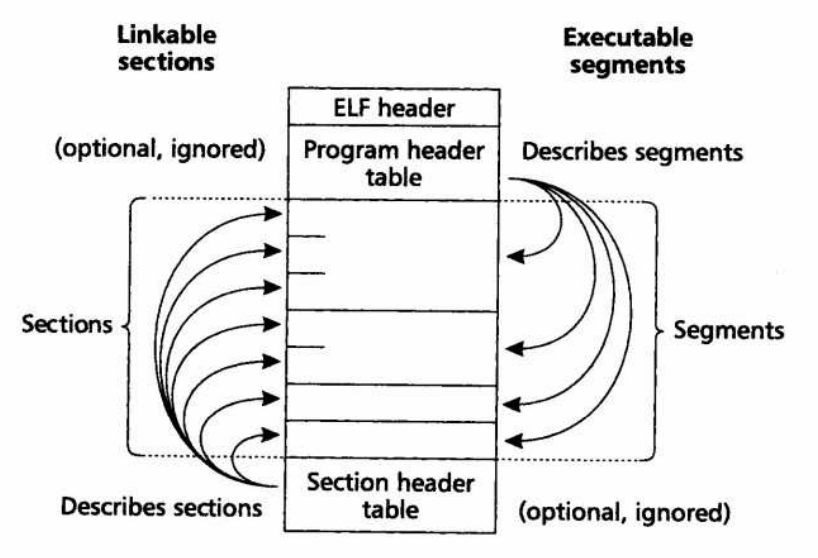
    <content type="html"><![CDATA[<p>本文的目的是通过计算一个 ELF 文件各部分的<strong>大小</strong>来认识 ELF 文件的组成。</p><h2 id="基础知识"><a href="#基础知识" class="headerlink" title="基础知识"></a>基础知识</h2><p class='item-img' data-src='/../images/2802c1b8-a901-430c-87d1-3f8b4a481953.png'><img src="/../images/2802c1b8-a901-430c-87d1-3f8b4a481953.png" alt="链接器的两种视角"></p><p>ELF 文件的主要部分，</p><ul><li>从链接器的视角来看由<code>section</code>组成，每个<code>section</code>的信息记录在 ELF 文件尾部的<code>section header table</code>部分</li><li>从加载器的视角（即执行视角）来看由<code>segment</code>组成，每个<code>segment</code>的信息记录在 ELF 文件头部的<code>program header table</code>部分</li></ul><h2 id="ELF-文件大小计算"><a href="#ELF-文件大小计算" class="headerlink" title="ELF 文件大小计算"></a>ELF 文件大小计算</h2><figure class="highlight c"><table><tr><td class="gutter"><pre><span class="line">1</span><br><span class="line">2</span><br><span class="line">3</span><br><span class="line">4</span><br></pre></td><td class="code"><pre><code class="hljs c"><span class="hljs-type">int</span> <span class="hljs-title function_">main</span><span class="hljs-params">()</span><br>&#123;<br>    <span class="hljs-keyword">return</span> <span class="hljs-number">0</span>;<br>&#125;<br></code></pre></td></tr></table></figure><p>使用<code>gcc -o test test.c</code>编译上面的 c 文件，并用<code>ls -l</code>查看文件的大小（在作者的电脑上是 15832 字节）</p><p>使用<code>readelf -h test</code>可得知 ELF header 的相关信息</p><figure class="highlight plaintext"><table><tr><td class="gutter"><pre><span class="line">1</span><br><span class="line">2</span><br><span class="line">3</span><br><span class="line">4</span><br><span class="line">5</span><br><span class="line">6</span><br><span class="line">7</span><br><span class="line">8</span><br><span class="line">9</span><br><span class="line">10</span><br><span class="line">11</span><br><span class="line">12</span><br><span class="line">13</span><br><span class="line">14</span><br><span class="line">15</span><br><span class="line">16</span><br><span class="line">17</span><br><span class="line">18</span><br><span class="line">19</span><br><span class="line">20</span><br></pre></td><td class="code"><pre><code class="hljs plain">ELF Header:<br>  Magic:   7f 45 4c 46 02 01 01 00 00 00 00 00 00 00 00 00 <br>  Class:                             ELF64<br>  Data:                              2&#x27;s complement, little endian<br>  Version:                           1 (current)<br>  OS/ABI:                            UNIX - System V<br>  ABI Version:                       0<br>  Type:                              DYN (Position-Independent Executable file)<br>  Machine:                           Advanced Micro Devices X86-64<br>  Version:                           0x1<br>  Entry point address:               0x1040<br>  Start of program headers:          64 (bytes into file)<br>  Start of section headers:          13912 (bytes into file)<br>  Flags:                             0x0<br>  Size of this header:               64 (bytes)<br>  Size of program headers:           56 (bytes)<br>  Number of program headers:         13<br>  Size of section headers:           64 (bytes)<br>  Number of section headers:         30<br>  Section header string table index: 29<br></code></pre></td></tr></table></figure><p>本文只关注<strong>大小</strong>，由<code>Size of this header</code>可以得知<code>ELF header</code>的大小是 64 字节</p><p>program header table 应该紧随 ELF header 之后，那么其相对于 ELF 文件起始处的偏移应该也是 64 字节，<code>Start of program headers</code>一项可以验证此结论</p><p>program header table 里存放了多条 program header，每条 program header 都存放着每个<code>segment</code>的元数据。在本例中，由<code>Size of program headers</code>与<code>Number of program headers</code>可知 program header table 一共有 13 条，每一条的大小是 56 字节。即整个表的大小为 13 * 56 &#x3D; 728 字节。</p><p><code>sections</code>部分，或<code>segments</code>部分，应当紧随 program header table 之后，所以推测其起始偏移应该是 64 + 728 &#x3D; 792 字节处</p><p>使用<code>readelf -S -W test</code>命令，获得如下内容：</p><figure class="highlight plaintext"><table><tr><td class="gutter"><pre><span class="line">1</span><br><span class="line">2</span><br><span class="line">3</span><br><span class="line">4</span><br><span class="line">5</span><br><span class="line">6</span><br><span class="line">7</span><br><span class="line">8</span><br><span class="line">9</span><br><span class="line">10</span><br><span class="line">11</span><br><span class="line">12</span><br><span class="line">13</span><br><span class="line">14</span><br><span class="line">15</span><br><span class="line">16</span><br><span class="line">17</span><br><span class="line">18</span><br><span class="line">19</span><br><span class="line">20</span><br><span class="line">21</span><br><span class="line">22</span><br><span class="line">23</span><br><span class="line">24</span><br><span class="line">25</span><br><span class="line">26</span><br><span class="line">27</span><br><span class="line">28</span><br><span class="line">29</span><br><span class="line">30</span><br><span class="line">31</span><br><span class="line">32</span><br></pre></td><td class="code"><pre><code class="hljs plain">Section Headers:<br>  [Nr] Name              Type            Address          Off    Size   ES Flg Lk Inf Al<br>  [ 0]                   NULL            0000000000000000 000000 000000 00      0   0  0<br>  [ 1] .interp           PROGBITS        0000000000000318 000318 00001c 00   A  0   0  1<br>  [ 2] .note.gnu.property NOTE           0000000000000338 000338 000020 00   A  0   0  8<br>  [ 3] .note.gnu.build-id NOTE           0000000000000358 000358 000024 00   A  0   0  4<br>  [ 4] .note.ABI-tag     NOTE            000000000000037c 00037c 000020 00   A  0   0  4<br>  [ 5] .gnu.hash         GNU_HASH        00000000000003a0 0003a0 000024 00   A  6   0  8<br>  [ 6] .dynsym           DYNSYM          00000000000003c8 0003c8 000090 18   A  7   1  8<br>  [ 7] .dynstr           STRTAB          0000000000000458 000458 000088 00   A  0   0  1<br>  [ 8] .gnu.version      VERSYM          00000000000004e0 0004e0 00000c 02   A  6   0  2<br>  [ 9] .gnu.version_r    VERNEED         00000000000004f0 0004f0 000030 00   A  7   1  8<br>  [10] .rela.dyn         RELA            0000000000000520 000520 0000c0 18   A  6   0  8<br>  [11] .init             PROGBITS        0000000000001000 001000 000017 00  AX  0   0  4<br>  [12] .plt              PROGBITS        0000000000001020 001020 000010 10  AX  0   0 16<br>  [13] .plt.got          PROGBITS        0000000000001030 001030 000008 08  AX  0   0  8<br>  [14] .text             PROGBITS        0000000000001040 001040 0000f4 00  AX  0   0 16<br>  [15] .fini             PROGBITS        0000000000001134 001134 000009 00  AX  0   0  4<br>  [16] .rodata           PROGBITS        0000000000002000 002000 000004 04  AM  0   0  4<br>  [17] .eh_frame_hdr     PROGBITS        0000000000002004 002004 00002c 00   A  0   0  4<br>  [18] .eh_frame         PROGBITS        0000000000002030 002030 0000ac 00   A  0   0  8<br>  [19] .init_array       INIT_ARRAY      0000000000003e00 002e00 000008 08  WA  0   0  8<br>  [20] .fini_array       FINI_ARRAY      0000000000003e08 002e08 000008 08  WA  0   0  8<br>  [21] .dynamic          DYNAMIC         0000000000003e10 002e10 0001b0 10  WA  7   0  8<br>  [22] .got              PROGBITS        0000000000003fc0 002fc0 000028 08  WA  0   0  8<br>  [23] .got.plt          PROGBITS        0000000000003fe8 002fe8 000018 08  WA  0   0  8<br>  [24] .data             PROGBITS        0000000000004000 003000 000010 00  WA  0   0  8<br>  [25] .bss              NOBITS          0000000000004010 003010 000008 00  WA  0   0  1<br>  [26] .comment          PROGBITS        0000000000000000 003010 00001f 01  MS  0   0  1<br>  [27] .symtab           SYMTAB          0000000000000000 003030 000348 18     28  18  8<br>  [28] .strtab           STRTAB          0000000000000000 003378 0001c9 00      0   0  1<br>  [29] .shstrtab         STRTAB          0000000000000000 003541 000110 00      0   0  1<br></code></pre></td></tr></table></figure><p>重点看 Off(set) 与 Size 两列。offset 是该 section 相对于整个 ELF 文件起始的偏移，第一个有实质内容的 section 是<code>.interp</code>，其起始偏移为 0x318，正好对应前文的 792 字节。</p><p>随后，看最后的 section <code>.shstrtab</code>，其起始偏移为 0x3541，大小为 0x110，即所有 sections 的结束偏移为 0x3541 + 0x110 &#x3D; 0x3651，即 13905 字节。</p><p>section header table 应当紧随 sections 之后，即其起始偏移为 13905 字节。由<code>Number of section headers</code>与<code>Size of section headers</code>可知，表中有 30 条 section header，每条的大小是 64 字节，所以表的大小是 30 * 64 &#x3D; 1920 字节。那么整个文件的大小为 13905 + 1920 &#x3D; 15825 字节。</p><p>我们验证一下</p><figure class="highlight bash"><table><tr><td class="gutter"><pre><span class="line">1</span><br><span class="line">2</span><br></pre></td><td class="code"><pre><code class="hljs bash">$ <span class="hljs-built_in">du</span> -b <span class="hljs-built_in">test</span><br>15832   <span class="hljs-built_in">test</span><br></code></pre></td></tr></table></figure><p>咦，实际的大小是 15832 字节。问题在于 ELF 文件的每一部分都是 8 字节对齐的（<strong>TODO</strong>：在哪定的？），所以，虽然 sections 的结束偏移为 13905 字节，但 section header table 应当对齐 8 字节，即应当从 13912 偏移处开始，从 ELF header 中的<code>Start of section headers</code>可以验证此结论。</p><ul><li><a href="https://zhuanlan.zhihu.com/p/363488456">elf 文件格式 -1- 可执行文件 - 黄导 - 知乎</a></li></ul>]]></content>


    <summary type="html">&lt;p&gt;本文的目的是通过计算一个 ELF 文件各部分的&lt;strong&gt;大小&lt;/strong&gt;来认识 ELF 文件的组成。&lt;/p&gt;
&lt;h2 id=&quot;基础知识&quot;&gt;&lt;a href=&quot;#基础知识&quot; class=&quot;headerlink&quot; title=&quot;基础知识&quot;&gt;&lt;/a&gt;基础知识&lt;/h2&gt;&lt;</summary>


    <category term="linux" scheme="https://sakura286.github.io/tags/linux/"/>
    
  </entry>
  
  <entry>
    <title>搭建 apt 仓库</title>
    <link href="https://sakura286.github.io/2024-04-04/65ec9d8196b8/"/>
    <id>https://sakura286.github.io/2024-04-04/65ec9d8196b8/</id>
    <published>2024-04-04T16:27:50.000Z</published>
    <updated>2025-09-18T02:39:42.288Z</updated>
    
    <content type="html"><![CDATA[<h2 id="目标"><a href="#目标" class="headerlink" title="目标"></a>目标</h2><p>手里有几个包，想搭建一个 apt 仓库，对应发行版为 Debian unstable riscv64</p><h2 id="思路"><a href="#思路" class="headerlink" title="思路"></a>思路</h2><p>这里的 server 指的是提供 apt 仓库服务的机器，client 指的是要访问 apt 仓库的机器</p><ol><li>(server) 为本机生成 GPG 公钥与私钥</li><li>(server) 使用 aptly 添加包，并生成仓库的 snapshot</li><li>(server) 使用 nginx 搭建私有的服务器，存放生成的 snapshot</li><li>(client) 添加公钥，修改 apt 配置</li></ol><h2 id="步骤"><a href="#步骤" class="headerlink" title="步骤"></a>步骤</h2><h3 id="1-生成-gpg-key"><a href="#1-生成-gpg-key" class="headerlink" title="1. 生成 gpg-key"></a>1. 生成 gpg-key</h3><h4 id="生成签名用的-GPG-KEY"><a href="#生成签名用的-GPG-KEY" class="headerlink" title="生成签名用的 GPG KEY"></a>生成签名用的 GPG KEY</h4><p>运行命令：<code>gpg --full-gen-key</code>，按照提示操作。</p><p><code>~/.gnupg/openpgp-revocs.d/</code>目录下生成<code>.rev</code>的 key 文件</p><h4 id="生成-ASCII-格式的公钥"><a href="#生成-ASCII-格式的公钥" class="headerlink" title="生成 ASCII 格式的公钥"></a>生成 ASCII 格式的公钥</h4><p><code>gpg --output &lt;key_filename&gt; --export &lt;your_email&gt;</code></p><p>请确保<code>&lt;your_email&gt;</code>与生成私钥时所用的邮箱相同</p><h3 id="2-使用-aptly-添加包，并生成仓库的-snapshot"><a href="#2-使用-aptly-添加包，并生成仓库的-snapshot" class="headerlink" title="2. 使用 aptly 添加包，并生成仓库的 snapshot"></a>2. 使用 aptly 添加包，并生成仓库的 snapshot</h3><p>安装 aptly 后，创建仓库，本步骤执行后将生成<code>~/.aptly</code>目录</p><figure class="highlight bash"><table><tr><td class="gutter"><pre><span class="line">1</span><br><span class="line">2</span><br><span class="line">3</span><br></pre></td><td class="code"><pre><code class="hljs bash"><span class="hljs-comment"># 请拓展尖括号的内容, 例如，我这边拓展后是这样的</span><br><span class="hljs-comment"># aptly repo create -architectures riscv64 -comment &#x27;private riscv64 repo&#x27; -component main -distribution unstable my_repo</span><br>aptly repo create -architectures &lt;<span class="hljs-built_in">arch</span>&gt; -comment &lt;your_comment&gt; -component &lt;component&gt; -distribution &lt;distrubution&gt; &lt;repo_name&gt;<br></code></pre></td></tr></table></figure><p>向仓库内添加若干包，本步骤执行后将在<code>~/.aptly/pool</code>目录下存放所添加包的拷贝</p><figure class="highlight bash"><table><tr><td class="gutter"><pre><span class="line">1</span><br></pre></td><td class="code"><pre><code class="hljs bash">aptly repo add &lt;repo_name&gt; &lt;pkg_path&gt;<br></code></pre></td></tr></table></figure><p>创建仓库 snapshot 并发布，此过程会要求使用 GPG 私钥签名，所以会提示输入生成 GPG 私钥时的密码</p><p>发布后的仓库在<code>~/.aptly/pool</code></p><figure class="highlight bash"><table><tr><td class="gutter"><pre><span class="line">1</span><br><span class="line">2</span><br></pre></td><td class="code"><pre><code class="hljs bash">aptly snapshot create &lt;snapshot_name&gt; from repo &lt;repo_name&gt;<br>aptly publish -architectures &lt;<span class="hljs-built_in">arch</span>&gt; snapshot &lt;snapshot_name&gt;<br></code></pre></td></tr></table></figure><h3 id="3-搭建服务器"><a href="#3-搭建服务器" class="headerlink" title="3. 搭建服务器"></a>3. 搭建服务器</h3><p>使用 nginx 搭建文件服务器，使得外部网络可以访问仓库内容</p><figure class="highlight bash"><table><tr><td class="gutter"><pre><span class="line">1</span><br><span class="line">2</span><br><span class="line">3</span><br><span class="line">4</span><br><span class="line">5</span><br><span class="line">6</span><br><span class="line">7</span><br><span class="line">8</span><br><span class="line">9</span><br><span class="line">10</span><br></pre></td><td class="code"><pre><code class="hljs bash">sudo apt-get install nginx -y<br><span class="hljs-comment"># 修改 root /var/www/html; 为目标目录</span><br><span class="hljs-comment"># 并在添加下面一行</span><br><span class="hljs-comment"># autoindex on;</span><br>sudo vim /etc/nginx/sites-enabled/default<br><br>sudo systemctl restart nginx.service<br><br><span class="hljs-comment"># 别忘了用浏览器访问一下</span><br><span class="hljs-comment"># http://&lt;ip_address&gt;/public</span><br></code></pre></td></tr></table></figure><h3 id="4-在-client-端访问-apt-仓库"><a href="#4-在-client-端访问-apt-仓库" class="headerlink" title="4. 在 client 端访问 apt 仓库"></a>4. 在 client 端访问 apt 仓库</h3><p>注意，服务器我们已经搭建好了，接下来的操作在客户端上进行</p><p>将前文中的公钥添加至本机配置，<strong>TODO：使用 DEB-822 格式，添加</strong></p><figure class="highlight bash"><table><tr><td class="gutter"><pre><span class="line">1</span><br></pre></td><td class="code"><pre><code class="hljs bash">sudo apt-key add &lt;key_filename&gt;<br></code></pre></td></tr></table></figure><p>在 apt 配置中写入如下一行</p><figure class="highlight bash"><table><tr><td class="gutter"><pre><span class="line">1</span><br><span class="line">2</span><br></pre></td><td class="code"><pre><code class="hljs bash"><span class="hljs-comment"># 例如，我这边的是 deb http://10.9.127.200/public/ unstable main</span><br>deb &lt;server_path&gt; &lt;distrubution&gt; &lt;component&gt;<br></code></pre></td></tr></table></figure><h2 id="已知问题"><a href="#已知问题" class="headerlink" title="已知问题"></a>已知问题</h2><p><strong>TODO</strong></p><ol><li>需要对 aptly 进行进一步的解释</li><li>需要对 gpg 签名的原理进行进一步的解释</li></ol><h2 id="参考资料"><a href="#参考资料" class="headerlink" title="参考资料"></a>参考资料</h2><ul><li><a href="https://www.aftermath.cn/2023/06/03/aptly-usage/">aptly 搭建本地仓库 - vimer</a></li><li><a href="https://blog.csdn.net/weixin_44979075/article/details/124747355">动手搭建一个私有的 apt 服务器 - csdn</a></li><li><a href="https://talk.quwj.com/topic/1897">手动自建 APT 仓库步骤 - 趣小组</a></li><li><a href="https://docs.github.com/zh/authentication/managing-commit-signature-verification/generating-a-new-gpg-key">生成新 GPG 密钥 - GitHub</a></li></ul>]]></content>


    <summary type="html">&lt;h2 id=&quot;目标&quot;&gt;&lt;a href=&quot;#目标&quot; class=&quot;headerlink&quot; title=&quot;目标&quot;&gt;&lt;/a&gt;目标&lt;/h2&gt;&lt;p&gt;手里有几个包，想搭建一个 apt 仓库，对应发行版为 Debian unstable riscv64&lt;/p&gt;
&lt;h2 id=&quot;思路&quot;&gt;&lt;a </summary>


    <category term="repology" scheme="https://sakura286.github.io/tags/repology/"/>
    
    <category term="debian" scheme="https://sakura286.github.io/tags/debian/"/>
    
  </entry>
  
  <entry>
    <title>Hello-World</title>
    <link href="https://sakura286.github.io/2022-07-30/44f2583c960a/"/>
    <id>https://sakura286.github.io/2022-07-30/44f2583c960a/</id>
    <published>2022-07-30T18:42:32.000Z</published>
    <updated>2025-09-18T02:39:42.288Z</updated>
    
    <content type="html"><![CDATA[<p>就像是装系统一样，建站的事情来来回回也很多次了，不过只是为了体验建站本身如垦荒一样的过程，以及满足自己对未来的博客文章能够硕果累累的想象。但也同装系统一样，逐渐发觉如果只是这样做，如果只是在重复无法进行积累的事情，那么是无法对自己的过去赋予意义的。活着是为了什么呢？</p><p>我暂且把站点的名字取为“你无法体验苹果本身”，只是因为自己对哲学，尤其是对休谟的一些粗浅的兴趣爱好。我们能感受到苹果的颜色、气味、口感，却无法直接感到苹果本身。那么，我们能感受到“我”吗？我们能感受到的，只有自己正在进行的心理活动——快乐，悲伤，愤怒，抑或无聊，我们无法感到一个没有心理活动的自己。思考这种无聊的问题在以前满足了我的虚荣心，到现在……也不能说没有，但我想我应该逐渐发现这件事本身其实已经足够有趣了。所以我把我认为的这里面最有趣的一个问题设为站点的名字。</p><p>关于我的 ID ，“ 286 ”已经是很久远的事情了，源自我当时翻得快要背过的小学计算机课本里提到的 80286，我当时认为它很慢（虽然确实很慢），就把这个引申为“小傻瓜”的意思（成年人了要在黑历史前稳住）。“ Sakura ”就已经比较近了，是在大一时读到的《龙族III》里路明非在牛郎店工作时的花名，当时还没有接触日语，错误地把这个读成了带俄语味的<code>/səˈku:la/</code>（并觉得很酷！），直到毕业后有数个朋友跟我说“很难想象一个叫樱花的男人”后，发现这个ID已经到处使用没法再改了才追悔莫及，啊，万恶的历史包袱，万恶的兼容。</p><p>基本的介绍就到这里吧，希望这个博客能像自己这几年装系统一样，能活得久一点。</p>]]></content>


    <summary type="html">&lt;p&gt;就像是装系统一样，建站的事情来来回回也很多次了，不过只是为了体验建站本身如垦荒一样的过程，以及满足自己对未来的博客文章能够硕果累累的想象。但也同装系统一样，逐渐发觉如果只是这样做，如果只是在重复无法进行积累的事情，那么是无法对自己的过去赋予意义的。活着是为了什么呢？&lt;/p&gt;</summary>


    <category term="record" scheme="https://sakura286.github.io/tags/record/"/>
    
  </entry>
  
</feed>